


The developer of RegCleaner, jv16 PowerTools, Uninstalr, WinFindr, Startup Timer, ScreenshotX, System Examiner and Windows Update Fixer.
There is a particular kind of optimism that I believe only software developers possess. It is the optimism that says, “This should be a fairly straightforward release,” usually followed up by, “It’ll probably take a week or two to build.”
This optimism is always wrong, and I never learn. But it is kind of funny in hindsight. The same kind of funny how one’s old Facebook posts are funny.
It is not merely wrong in the way a weather forecast is wrong, where you packed the wrong jacket and now your elbows are slightly damp. It is wrong in the way an ancient map is wrong, where the area marked “a great shortcut” turns out to contain dragons, a swamp, and a surprisingly well-maintained legacy installer from 2009 that stores its data in a location no civilized program should ever visit.
Uninstalr version 3.1 started with what looked like a modest set of goals: Make the app start faster. Use less memory. Detect apps that start automatically with Windows. Improve overall accuracy.
Simple, right?
Yes. In the exact same sense that “just build a small bridge” is simple, provided one ignores rivers, gravity, corrosion, permits, budgets, physics, and the fact that somebody once buried a pipe exactly where the foundation needs to go.
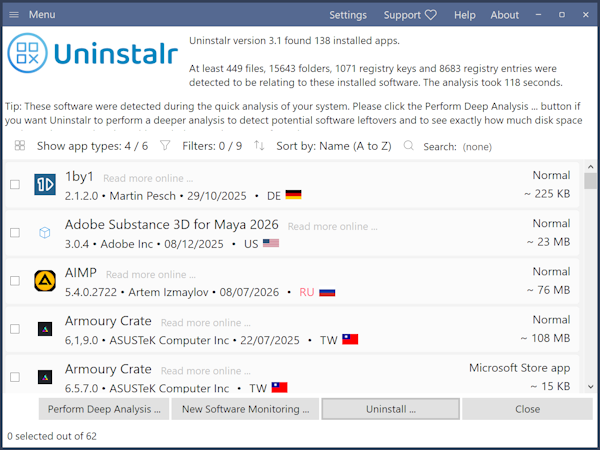
Uninstalr 3.1 took me three months to develop. During that time, I made 139 test builds and 14 release candidate versions. A release candidate, for those lucky enough to live outside this particular circle of software-development purgatory, is a version that is supposed to be almost ready to ship. It is called a candidate because it is auditioning for the role of “actual release.” In my case, thirteen of them did not get the part.
This release was not easy. It was educational, though, in the same way falling down stairs teaches you about architecture.
My Stance on AI
Speaking of architecture, there is a slightly related topic I want to address: AI.
As you have perhaps noticed, there has been a little bit of noise about those two letters lately. It seems a lot of people are releasing software these days that is built entirely by AI, pushing new versions out at breakneck speed.
I am not one of those people. In fact, I just published the official AI Policy on the main company website. It is very simple: Humans made this software, not AI.
This does mean it can take me three months to build an update for Uninstalr. But it also means there is a human level of care and quality control in that new version.
Declaring that I don’t rely on AI agents or whatever the latest buzz words are, doesn’t mean I think my software is perfect. If you look at the Changelog, you will see a few known bugs even in the new version. Clearly human built software doesn’t mean it’s perfect and bug-free. However, rigorous testing means those bugs are detected and documented and maybe even fixed in the future.
Uninstalr 3.1 “Final Final”
As you probably know, Uninstalr is free software. It has no nag screens, and everyone can use it as they wish. To support development, I run a Patreon page where I offer special perks like early access to beta and preview versions.
If you are one of those amazing people supporting me on Patreon, you might want to double-check that your Uninstalr 3.1 is showing version number 3.1.0.616. Because there were many preview versions and release candidates, all called “3.1”, which makes things a bit confusing.
If you are unsure whether you have the official version 3.1, open the About window of Uninstalr and ensure it says you are running build 616. Or verify from the executable file’s properties that it is version 3.1.0.616. That is the actual, final final version 3.1.
Faster startup, smaller memory usage, and fewer reasons to sigh dramatically
The first major improvement in Uninstalr 3.1 is that once the initial scan has completed, the program will launch and display the list of installed apps faster than ever. It also uses much less memory while doing so.
This sounds like one of those release-note lines that gets politely ignored. “Improved performance.” Lovely. Did you also “enhance stability” and “make various minor improvements,” perhaps while wearing a beige cardigan?
But the scanning speed for installed apps has been the number one piece of feedback for Uninstalr since day one. That’s why I spent a considerable amount of time optimizing the code.
For example, on one of my test systems with 173 installed apps, Uninstalr 3.0’s first scan took 39 seconds, and the second scan took 23 seconds while using 430 MB of RAM. On that exact same system, Uninstalr 3.1’s first scan takes 83 seconds, but the second scan takes only 12 seconds and uses just 281 MB of RAM.
In other words, every time Uninstalr needs to do a deep, full system analysis, such as when you first run the software or right after uninstalling many apps, it will take some time. But subsequent scans will be considerably faster and much lighter on your RAM.
It’s important to note, however, that speed depends on your system’s data. Since one of the major improvements in version 3.1 is better portable app detection, if your system is packed with portable apps, version 3.1 might actually run slower than 3.0, but it is doing a vastly better job of finding them.
If you want to tweak this, Uninstalr’s Settings screen allows you to adjust how the scanning works. If you aren’t interested in tracking down portable apps or software leftovers, disabling those options will make the scan faster.
All that being said, focusing solely on raw speed misses the point.
The goal of Uninstalr is not to be the fastest. It is trivially easy to display a basic, low-quality list of installed software in a second or two, just like Windows or most other uninstallers do. You could ask ChatGPT to build an app that does that right now.
The point of Uninstalr is to analyze your computer file-by-file and folder-by-folder to show you absolutely everything hiding in there. Uninstalr aims to be the most accurate uninstaller, not the fastest. If you don’t have two minutes to spare for a deep, initial scan, you might need to re-evaluate your life and perhaps use a different software.
Yes, Uninstalr is not for everyone. It is like a safety razor. Even if it’s called a safety razor, you can nick your face if you don’t know how to use it, or if you just want the fastest possible shave.
Apps that start with Windows are now highlighted
The second major change in Uninstalr 3.1 is that it now detects and highlights apps that automatically start with Windows.
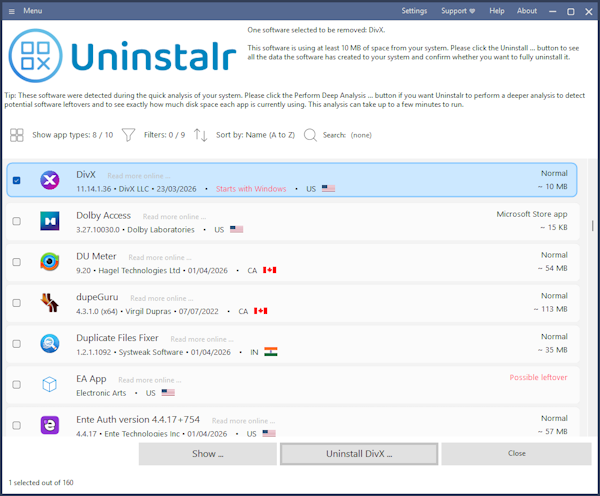
Startup apps matter. They are typically the number one reason computers slow down over time, dragging down background resources, and leaving you with the general sensation that your computer has decided to begin every morning by dragging a grand piano through mud.
Many applications configure themselves to launch at startup. Some do this for excellent reasons. Security software, sync tools, and device utilities often need to be available right away.
Others do this for reasons that are, let us say, overly ambitious. A PDF utility may not strictly need to greet the dawn with you. A game launcher may not be spiritually required to awaken before you do. A printer status monitor from a printer you replaced two apartments ago may be displaying a touching amount of loyalty, but it is time to let go.
Uninstalr 3.1 helps by showing you exactly which installed apps are auto-starting. This gives you vital context when deciding what to remove, what to keep, and what may be quietly contributing to that “why is my computer like this” feeling.
To be clear, Uninstalr highlighting an auto-starting app isn’t an explicit directive to delete it. Rather, it’s a prompt for you to consider whether you really need it running 24/7. If you don’t, you can check that software’s settings to disable it.
Portable app detection is hard, but it’s quite a bit better now
The third major improvement in Uninstalr 3.1 is greatly enhanced detection of portable apps.
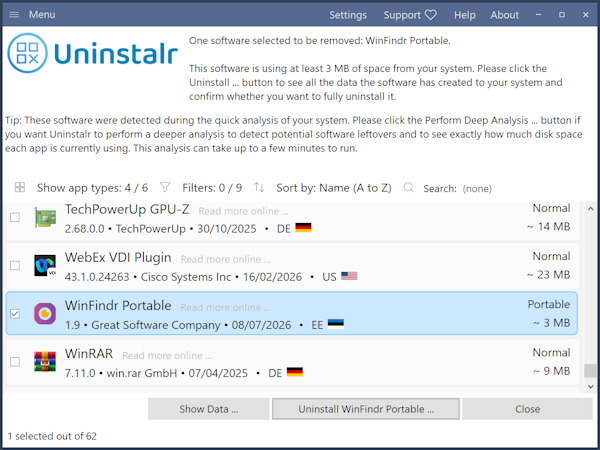
This is the sort of feature that sounds niche until you realize how many programs are portable, semi-portable, portable-adjacent, zip-extracted, copied-from-an-old-drive, launcher-based, or otherwise self-contained. These apps live on your drive without politely registering themselves or letting Windows know they exist.
Most third-party uninstallers simply give up and don’t even bother trying to detect portable apps, and the default Windows “Installed Apps” list ignores them entirely. Why? Because detecting them accurately is incredibly difficult.
Without diving too deep into the messy technical weeds, let’s look at a few examples:
- Single-file portables: Take WinFindr, a utility I make, by the way. Its portable version is a single executable called
WinFindr_Portable.exe. To find apps like this, Uninstalr essentially has to scan every single executable on your system and see if the filename matches a known portable app. - Deeply nested folders: Take the portable version of AIMP. It lives inside a folder structure (AIMP -> App -> AIMP -> executables). In total, a portable AIMP folder contains 362 files and 59 subfolders. Uninstalr has to look at this chaotic cluster and correctly identify it as a single portable app.
- Launcher ecosystems: Platforms like PortableApps.com or the excellent utilities from NirSoft use their own distinct delivery systems and launchers. Uninstalr 3.1 now features dedicated, tailored support to scan and recognize apps from both of these ecosystems.
As you can see, things get complicated very quickly. Making this work beautifully took a lot of testing and a healthy dose of humility, which is just a polite way of saying I got things wrong, fixed them, and tried again.
Russians are going to get upset again
Starting with version 3.0, one unique feature of Uninstalr has been that it shows the country of origin of your installed software without contacting any remote servers or calling home. As far as I know, no other uninstaller can do that.
Since Uninstalr doesn’t come with a Russian translation and there are random anti-war remarks on the website, I have received a fair amount of criticism from some rather Russian sounding trolls.
Because of this, I added a new feature to version 3.1 that allows you to see installed software from specific countries highlighted in red, such as those from Russia. In case you want to avoid such software. I don’t know, you do you. This highlight in red feature can obviously be disabled from the Settings.
Three months, 139 test builds, and the slow erosion of happiness
It took over three months to get version 3.1 out the door.
That number is not meant to impress you. In fact, a decent argument could be made that it should embarrass me. A more majestic software team might say, “We maintained a clean internal pipeline and shipped exactly on schedule.” I am instead saying, “I made 139 builds and named some of the internal files things that probably should not be preserved by history.”
But those builds were necessary.
Each one represented a combination of improvement, experiment, correction, regression, re-correction, surprise, apologies to my future self, and small victories. Software development is rarely a straight line. Instead, it is a series of loops, each one beginning with “This should work now” and ending with “Wait, why is that machine behaving differently?”
Uninstalr is especially prone to this because uninstalling software is deeply tied to the messy reality of individual operating systems. Every Windows machine has its own unique history. Apps have been installed, updated, moved, partially deleted, abandoned, resurrected, and occasionally attacked by vendor utilities with the bedside manner of a wood chipper.
A pristine virtual machine is great for initial testing, but it is a fantasy novel. Real systems are where the strange things live. Real systems have orphaned registry entries, startup tasks pointing to missing files, and portable apps buried inside folders that also contain backups, logs, and a copy of an installer that should have been deleted during the Obama administration.
So there was a lot of testing. A lot. And I believe it was entirely worth it.
Thank you for your support!
Thank you to everyone who tested the public builds and release candidates, reported bugs, noticed odd behaviors, and helped me refine this release. You kept several bugs from enjoying a public career.
Now, at long last, Uninstalr 3.1 is ready. You can download it from: https://uninstalr.com/download/ and the full Changelog is available here: https://uninstalr.com/changelog/
Uninstalr is completely free software. If you can spare a few minutes to support me, it would mean the world. Here is how you can help:
- Review Uninstalr on TrustPilot: I recently opened a profile here: TrustPilot Review
- Vote or review Uninstalr on AlternativeTo: Check out the page here: AlternativeTo Uninstalr
- Spread the word: Dust off your old Facebook account and recommend Uninstalr to acquaintances until they unfriend you, or give me a shout-out to random strangers on Reddit.
Every little bit helps out immensely.
Thank you again, and I truly hope you enjoy Uninstalr 3.1. I can’t say I always enjoyed making it, because it was incredibly tedious and difficult, but I hope the final product was worth it!