


The developer of RegCleaner, jv16 PowerTools, Uninstalr, WinFindr, Startup Timer, ScreenshotX, System Examiner and Windows Update Fixer.
Uninstalr includes a “Read more online” feature that provides detailed information about installed programs. This helps you make informed decisions about which software to remove.
Table of Contents
What is the “Read More Online” Feature?
The “Read more online” feature gives you access to more information about any program on your system, such as what the software does, who makes the software, a link to the software publisher’s website, and a detailed description of the software.
Accessing Program Details
To use this feature, simply click the “Read more online…” text next to the software name in the list of installed software.
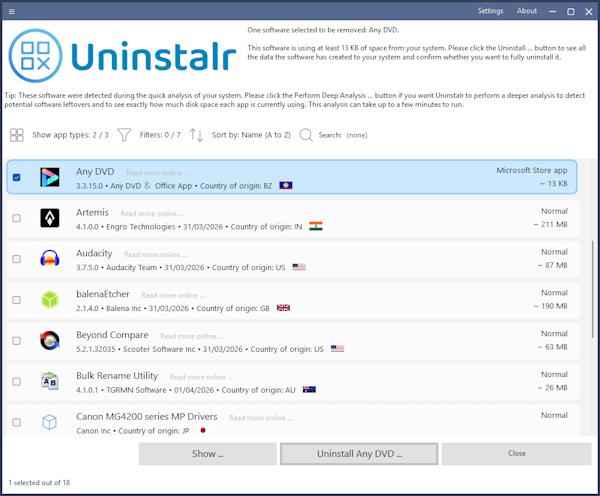
This will automatically redirect you to Uninstalr’s website page, where you can view more detailed information about the program.
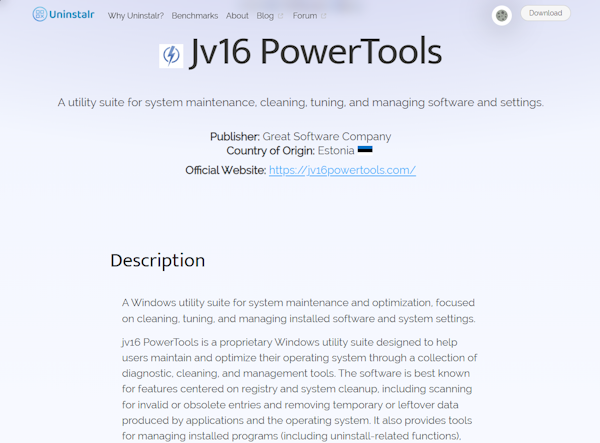
Understanding the Information Provided
The information page includes a program description that explains what the software does and its primary functions.
It also includes the name of the software publisher and a link to the official website.
In the “Description” section, you can see a more detailed description of the software: what it exactly does, its main features, and additional information related to the software.